iPhone Photo
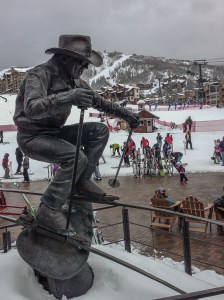
Yet another iPhone shot from Colorado. I actually took a day away from my camera and went skiing while out there. I had thoughts of taking my gear with me, but the conditions were such that most of the time you couldn’t see very far in front of you. That is hardly the time to take landscape pictures. I did have my phone with me though so that I could get some pictures. I took this one from the outdoor lounge after we had skied for the day. This statue used to be next to the gondola the last time I was on the mountain. I guess that the landscape really does change quickly out there. I have always liked this sculpture, and I was happy to be able to include it on my site. Over the years Steamboat has been the place that we keep going back to. It has been fun watching this little ski resort grow. The runs have grown, the resort community has grown tremendously, but the town still has that great charm that makes it so fun to visit.
Technical Data
As I said before this was taken with my iPhone. I did not edit it in Camera+ as I usually do though. The program is great, but I usually don’t get subtle results with it. Instead I brought the picture into Lightroom on my computer to adjust it a bit. I wanted a little more punch than the phone gave me that day. I adjusted the highlights and shadows to bring out some of the light that was missed as well as a clarity adjustment for the extra punch. The final step was one that I may not have needed to do. There was an ugly blue recycling container in the shot that I didn’t want. It was too big to clone out in Lightroom so I had to come up with something else. I took the photo into On One Software’s Perfect Mask 5.2. This is part of the suite that I purchased just before the trip to Colorado. I had used it before and liked it, but the cost was too high. On One had a great sale just before I left so I took the opportunity to buy the product. I have only just now started getting to know it though. Getting the bin out of the way was not as easy as it could have been if I had the new Photoshop. They have the tool that automatically will take out unwanted objects. I had to be creative to I found myself in Perfect Mask. Once in the program I used the mask brush to paint out the ugly blue bin. I then took a copy of the photo that I had made previously, and moved it over just enough so that it would line up partially with the bricks. It was not a perfect match, but close enough. From there I sent the photo back to Lightroom where I used the clone brush to fix up the edges that were a little rough. You might not have even seen the spot if I didn’t mention it, but now that I did can you find it? It was a quick job with a few remnants left behind, but for an iPhone shot it is good enough.
 Dave Wegiel Photography