Photo of the Day
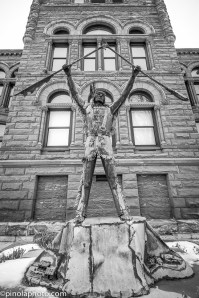
While in LaPorte last weekend I visited a couple of sites that I thought were iconic for the town. One of those has to be the Potawatomi Indian statue. As a child this statue used to be in between the courthouse and the county building. The indiana used to be the centerpiece of a very cool fountain. When the county building was repurposed the indian was moved to the side of the courthouse. Part of the fun of this blog is doing a quick bit of research on some of the subjects. This statue was part of LaPorte’s way of celebrating the bicentennial in 1976. That means that the statue is as old as I am, and it has moved a couple of times as well. During my photo 365 project I took a couple of pictures of this statue, and butchered them in my early days of HDR. It is nice to finally do this landmark a little justice here.
Technical Data
This statue is very cool, and has some nice aging that would look great in HDR. The problem though was the sky above the courthouse. It really was a flat grey sky that I could not crop out unless I got up on a ladder to take a picture of the indian. What to do here? First off I took my three bracketed images at +2, 0, and -2 and ran them through Photomatix. I then saved the 32 bit file, and reimported that into Lightroom. Then I used an HDR preset for black and white pictures created by Matt Kloskowski. You may wonder why I use these all the time? Well they are free presets given out at his blog Lightroom Killer Tips. I downloaded this black and white preset on the plane ride to Colorado, and I have really used it since then. It is a great way to get some great looking black and white shots. I don’t like the strong one so much, but the simple version is great. He just released a new tonal contrast preset that is very cool for bringing out the texture in your shots. I am sure that you will see that one on here in the near future in some form or another. It may just be in a layer for an image though as it is pretty strong.
 Dave Wegiel Photography